
how to make international calls
How to Make International Calls Without High Fees
Making an international call used to be a complicated affair. You’d have to figure out the right sequence of numbers—the exit code, the country code, and finally the local number. But today, technology has made connecting across the globe simpler and cheaper than ever, whether you're using your mobile, a VoIP app, or even just your web browser.

Remember the days when calling someone in another country felt like a huge deal? The whole process was confusing, and the constant fear of a massive phone bill made most of us think twice before dialing. Thankfully, things have changed. We've moved far beyond the days of expensive landline monopolies into a world full of flexible, internet-powered solutions.
The best part is, you now have more control than ever over how much you spend and the quality of your connection. Getting a handle on the different methods out there is the first step to making smarter, budget-friendly calls.
It wasn't that long ago that your options were pretty limited. Back in the early 2000s, calling internationally usually meant going through traditional carriers that charged a fortune per minute. A quick three-minute call from the US to Europe could easily set you back over $3.
The game has completely changed. Today, the global International Calling Market is valued at a whopping USD 1.29 billion and is still growing fast. You can read more about the growth of the international calling market. This boom is all thanks to new tech that makes calling abroad both easier and way cheaper.
To figure out the best way to make an international call, you need to know what tools are available. Each one is built for a different purpose, whether you're making a quick one-off call or need to stay in touch with family or clients regularly.
Here’s a look at the main methods we'll dive into:
We've put together a simple table to help you see how these methods stack up at a glance.
This table breaks down the most common ways to call abroad, highlighting typical costs, what you need to get started, and what situations they’re best suited for.
| Calling Method | Average Cost | Setup Required | Best For |
|---|---|---|---|
| Mobile Carrier Plans | High (often $10-15/mo plus per-minute fees) | Call your carrier to add a plan | Occasional calls where convenience is key |
| VoIP Calling Apps | Free or Low-Cost | Both parties must download the same app | App-to-app calls with good internet |
| Browser-Based Calling | Very Low (pay-as-you-go, $0.01-$0.15/min) | Quick online account creation | Calling any phone number (mobiles/landlines) without downloads |
| Traditional Landlines | Very High (can be $1-$3+ per minute) | None, if you have a landline | Calling from areas with no internet, as a last resort |
This should give you a good starting point for deciding which service fits your needs.
Picking the right method really comes down to a few things: how often you call, who you're calling (is it a mobile or a landline?), your budget, and whether you want the convenience of an app or the simplicity of calling from your browser. Thinking about these factors will help you avoid surprise fees and get a clear connection every single time.
Before you can connect with anyone overseas, you have to get the dialing sequence right. Think of it like a global address system for phones—mess up one part, and your call goes nowhere.
Once you understand the basic formula, you can confidently call any number on the planet. It’s a simple, universal structure that phone networks everywhere understand.
The entire sequence boils down to this: Exit Code + Country Code + Area Code + Local Number. Each piece tells the network exactly where to route your call, starting from your country and ending at the specific phone you want to reach. Miss a step, and you’ll likely get a frustrating "number not recognized" error.
Let's break down what each part actually does.
The exit code (or international access code) is your first step. It signals to your phone carrier that you’re about to dial a number outside your current country. For example, if you’re calling from the United States or Canada, your exit code is 011. Calling from the UK? It’s 00.
Next up is the country code. This is a one-to-three-digit number assigned to every country. Germany is 49, Australia is 61, and India is 91. After that, you just dial the city or area code and the local phone number you're trying to reach.
This screenshot shows a list of country calling codes, which are essential for directing your call to the right destination.
As you can see, the codes are grouped by geographic zones, which helps keep things organized.
Ever wondered about that "+" symbol on your mobile's dial pad? It’s a game-changer. The "+" is a universal shortcut for the exit code.
Just press and hold the "0" key on your smartphone, and the "+" will appear. Your phone automatically knows to use the correct exit code for whatever country you’re physically in. No more looking up codes while you travel.
Pro Tip: Always save your international contacts with the "+" symbol format (e.g., +61 412 345 678). It’s a lifesaver. This ensures the number works perfectly whether you're calling from home or traveling abroad, so you never have to edit numbers or remember local exit codes.
One of the most common mistakes people make is forgetting to drop the leading zero from the local number. In many countries, local numbers start with a "0" for domestic calls. When you dial internationally, you have to remove it.
Let's say you're in Berlin (exit code 00) and want to call a mobile in Sydney, Australia (country code 61). You would dial: 00 61 412 345 678.
But if you use your smartphone, it's even easier. Just dial: +61 412 345 678. The plus symbol handles the exit code for you, you pop in the country code, and then add the rest of the number—minus that pesky leading zero. Simple as that.
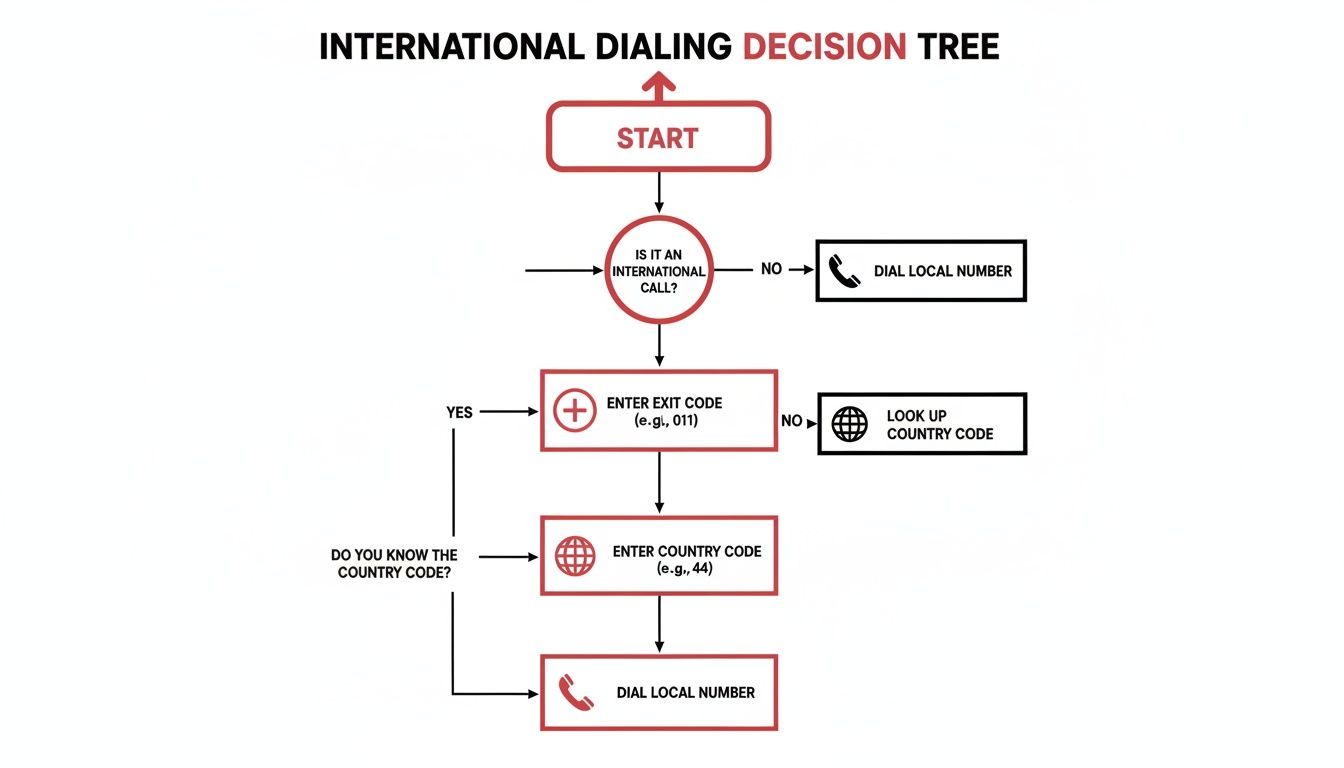
This simple chart breaks down how international dialing works. You start with your country's exit code, add the country code you're calling, and finish with the local number. Once you get the hang of it, the process is the same every time.
But how you make that call is where things get interesting. The method you choose will have a massive impact on your wallet, your convenience, and even the quality of your conversation.
Think of it like choosing how to travel. A quick call to a friend who also uses WhatsApp is like walking across the street—easy and free. But a critical business call to a landline in a rural area? That's more like a cross-country flight; you need a solution that's reliable and gets you exactly where you need to go.
Your first instinct might be to just use your mobile phone carrier. It’s simple, right? No new apps, no new accounts. But that convenience comes at a steep, often hidden, price. Most carriers lure you in with "international plans" that still hit you with sky-high per-minute rates. That can lead to some serious bill shock at the end of the month.
This is where Voice over IP (VoIP) changes the game.
VoIP services use your internet connection—whether it's Wi-Fi or mobile data—to make calls for a fraction of the cost. This is the technology behind all the popular calling apps and browser-based tools, effectively turning the internet into your personal, low-cost phone network.
The global shift to VoIP is undeniable. The market for international calling apps is set to grow at a 6.1% CAGR through 2031. It makes sense when you realize over 85% of smartphones run on Android or iOS, giving almost everyone easy access to VoIP. For businesses, the savings can be staggering—up to 70% compared to traditional phone lines. You can dig deeper into the booming international call services market to see just how fast things are changing.
The choice between a carrier and VoIP really boils down to this: are you willing to pay a premium for short-term convenience, or do you want long-term savings and flexibility? For anyone making regular international calls, VoIP is a no-brainer.
Let’s break down the three main ways to call abroad. Each has its pros and cons, depending on what you value most—cost, quality, or pure convenience.
| Feature | Traditional Landline | Mobile Carrier Plan | VoIP Service (App/Browser) |
|---|---|---|---|
| Cost Structure | High per-minute rates or expensive monthly add-on plans. | Very high per-minute rates; monthly plans often have caps. | Extremely low pay-as-you-go rates, often pennies per minute. |
| Call Quality | Generally excellent and stable, as it's a dedicated line. | Good, but can be affected by network congestion. | Excellent with a stable internet connection (Wi-Fi or 4G/5G). |
| Convenience | Low. You're tied to a physical location. | High. You can call from anywhere you have a signal. | Very high. Call from any device with a browser, no app needed. |
| Best For | People who rarely make international calls from home. | Emergency calls or very infrequent, short calls on the go. | Frequent callers, budget-conscious users, and businesses. |
As you can see, while your landline or mobile carrier might feel familiar, a VoIP service consistently offers the best balance of low cost, high quality, and unmatched flexibility for international communication.
Okay, so you’re sold on VoIP. Smart move. But even here, you’ve got a couple of choices to make. It mainly comes down to dedicated apps versus browser-based services.
Dedicated Apps (like WhatsApp or Skype): These are great for app-to-app calling, which is usually free. The catch? The person you're calling must have the exact same app installed on their smartphone. This is a dealbreaker if you need to reach a landline, a business, or your tech-averse grandma. Some older services are also being phased out, so it's smart to look for a reliable Skype replacement.
Browser-Based Services (like YodelPhone): This is the most flexible option. These platforms let you call any number in the world—mobile or landline—right from your web browser. No downloads, no installations, no making sure your contact has the right app. You just type in the number and talk.
So, which one is for you? If you only call people who you know use the same app, a dedicated app can work. But if you need the freedom to call any phone number, anytime, without the hassle, a browser-based service gives you the best of both worlds: the low cost of VoIP and the universal reach of a traditional phone.
Let's be honest, nobody likes getting a phone bill loaded with shocking international charges. The good news? You can completely avoid them. A few smart moves can slash your costs without forcing you to cut those important conversations short. It all comes down to shifting away from old-school carrier methods and embracing more flexible, internet-based options.
One of the easiest wins is something already built into your phone: Wi-Fi calling. When you turn this feature on, your phone smartly routes calls over a Wi-Fi network instead of cellular. This simple switch turns a potentially expensive international call into a free one. It's perfect when you're at home, in the office, or grabbing a coffee at a café with a solid connection.
Mobile carriers love to advertise their international "plans," but these are often traps for anyone who doesn't read the fine print. They might lure you in with a flat monthly fee of $10-$15, but that fee often just unlocks sky-high per-minute rates that kick in immediately. Always, always read the details.
This is where pay-as-you-go VoIP credit really shines. Instead of locking yourself into a monthly subscription you might barely use, you just add funds to an account and pay only for the minutes you actually talk. It’s a transparent, controlled way to manage costs, ensuring you never pay for more than you need. For a deeper dive, check out our guide on finding cheap international calls from the USA.
The scale of this industry is staggering. The wholesale voice carrier market is currently valued at USD 50.6 billion and is projected to explode to USD 171.6 billion by 2035. While traditional calls once cost $1-2 per minute, VoIP technology has crushed those rates down to mere fractions of a cent, making affordable global communication a reality for everyone. You can learn more about the trends driving this growth in the booming wholesale voice carrier market.
One of the most powerful strategies for both saving money and looking professional is using a virtual local number. Think of it as a phone number that's local to the country you're calling, but it rings directly on your device, wherever you are in the world.
When you call someone from a number they recognize as local, they are significantly more likely to answer. This simple switch can increase connection rates by up to 25% and helps avoid your number being flagged as spam by their carrier’s caller ID system.
Imagine you're a consultant in New York calling a client in London. Instead of your US number showing up, you can use a UK-based virtual number. Your client sees a familiar "020" London number and picks up without hesitation. On your end, you're paying a tiny per-minute rate instead of a massive international fee. It's a win-win that saves money and builds instant trust.
Even with the best tools, a few glitches can pop up when you’re making international calls. A crackly line or a dropped call is incredibly frustrating, but the good news is that most issues have simple fixes.
More often than not, the root of the problem is your internet connection, especially when using VoIP services.
A choppy or delayed voice almost always means your Wi-Fi signal is weak or unstable. Your first move should be to get closer to your router. If that doesn't solve it, try switching from Wi-Fi to your phone's mobile data (4G or 5G) for a more direct, stable connection.
Sometimes, the issue isn't your connection but other apps hogging all the bandwidth. Shutting down streaming services, big downloads, or video games running in the background can free up the resources you need for a clear, crisp call.
One of the most common roadblocks is that dreaded "number not recognized" or "call cannot be completed as dialed" error. This almost always points to a simple mistake in the dialing format. It’s easy to get one of the codes wrong when you’re in a hurry.
Start by double-checking every single part of the number you’re calling:
Take a moment to re-enter the number carefully, piece by piece. Verifying each component—exit code, country code, and the local number format—solves over 90% of dialing errors on the first try. It’s a simple check that saves a ton of frustration.
Another strange but common issue is one-way audio, where you can hear the other person perfectly, but they can't hear you. This usually points to a problem with your microphone settings. Check to make sure the app or browser you’re using has permission to access your mic.
Echoes can also completely derail a conversation. If you hear your own voice echoing back, the problem is almost always on the other person's end—their speaker volume is probably too high and their microphone is picking it up. Just ask them to lower their speaker volume or, ideally, switch to headphones. This small adjustment clears it up instantly.
If you suspect you're the one causing the echo, using headphones is the best fix. Also, be aware that some platforms have built-in limitations; for instance, you'll run into dead ends if you don't know that you can’t use WhatsApp to call landlines.
Even after laying out all the options, a few questions always pop up. Making calls across borders can feel a bit complex, but don't worry—the answers are usually simpler than you think. Let's tackle the most common questions we hear.
We'll clear up everything from how these calls hit your data plan to whether your grandma needs to install an app on her end. Let’s get these final details sorted so you can start dialing with confidence.
This is a big one, especially if you’re not on Wi-Fi. The short answer is yes, internet-based calling (VoIP) uses your mobile data—but probably a lot less than you imagine. The exact amount really depends on the app you're using and the quality of the call.
A typical voice-only call on a VoIP service uses somewhere between 0.5 MB and 1.5 MB of data per minute. That means a 10-minute chat would use about 5-15 MB. To put that into perspective, streaming a single minute of an HD YouTube video can easily use more data than that.
For most people, the data used by VoIP calls is barely a blip on their monthly plan. Unless you're on an extremely tight data budget, you’re unlikely to notice the impact, even if you’re making international calls regularly.
This is the make-or-break question that separates different types of calling services. The answer completely depends on which platform you’re using.
Closed-App Systems: Services like WhatsApp, FaceTime, and Facebook Messenger are a closed loop. They only work if both you and the person you're calling have the exact same app installed. You simply can't use them to ring a regular landline or a mobile number that isn't tied to that service.
Open Calling Platforms: This is where services like Skype or browser-based tools like YodelPhone really shine. They give you the freedom to call any phone number on the planet, whether it's a mobile or a classic landline. The person on the other end doesn’t need a special app or even an internet connection—their phone just rings like any other call.
This flexibility is absolutely essential if you need to reach businesses, older relatives, or anyone who doesn't live inside the same app ecosystem as you.
Years ago, internet calls had a bad reputation for being choppy and unreliable. That's ancient history. Modern VoIP technology, supercharged by fast internet like 5G and fiber optics, now delivers call quality that's often just as good as—or even better than—a traditional phone call.
The number one factor for a clear call is a stable internet connection. As long as you have a decent Wi-Fi signal or a solid 4G/5G connection, you can expect crisp, delay-free conversations. Most of the time, issues like echoes or dropped audio are caused by a weak or overloaded internet connection, not the calling service itself.
It’s smart to think about security. Reputable VoIP providers take this very seriously. The best services use end-to-end encryption to shield your conversations from anyone trying to listen in. This scrambles your call from your device all the way to the recipient, keeping it private and secure.
Always go with a provider that's upfront about its security measures. Browser-based services, for instance, get an extra layer of protection from the security protocols already built into browsers like Chrome and Firefox. Bottom line: making a call through a trusted VoIP provider is every bit as secure as using an old-school phone line.
Ready to make your first international call without downloading a thing? With YodelPhone, you can dial any number in the world, right from your browser, in less than a minute. You get crystal-clear quality and simple pay-as-you-go rates to call mobiles and landlines anywhere. Try YodelPhone today with a free one-minute trial—no credit card needed.
Article created using Outrank

Discover how international VoIP calls can save you money and simplify global communication. Learn how they work and how to get started in minutes.

Discover voip international calling that delivers clear, affordable global calls from your browser. Learn pricing, setup, and start saving today.

Unlock affordable global calling with a pay as you go international phone service. Learn how to save on calls without contracts or hidden fees.

Discover how to make international calls cheap using modern, simple methods. This guide covers the best apps, smart strategies, and common pitfalls to avoid.