
cheap international calls
How to Make Cheap International Calls Without Sacrificing Quality

We've all been there—that heart-stopping moment you see your phone bill after a long chat with family overseas. It's an all-too-common feeling. For decades, international calling meant staring down exorbitant per-minute rates from your mobile carrier or fumbling with confusing calling cards.
Thankfully, that era is over.
The shift from old-school phone networks to internet-based calling has completely changed the game. Staying connected with loved ones, clients, or colleagues across the globe no longer requires a massive budget. The secret is simply understanding the huge cost difference between the old way and the new.
A decade ago, calling a mobile number in a country like India or Nigeria from the US or Europe could easily cost you $0.40–$0.80 per minute through a standard mobile operator. It was outrageous. Today, modern web-based services routinely offer rates under $0.05–$0.10 for the exact same call.
Just by shifting 100 minutes of calls a month from your mobile carrier to a service like YodelPhone, you could see your bill drop from $50+ down to less than $15.
The single biggest mistake people make is sticking with their mobile carrier's international plan out of habit. Switching to a browser-based service takes less than a minute and can save you over 70% on your monthly calling expenses.
This chart visualizes the savings perfectly. It's not a small difference.
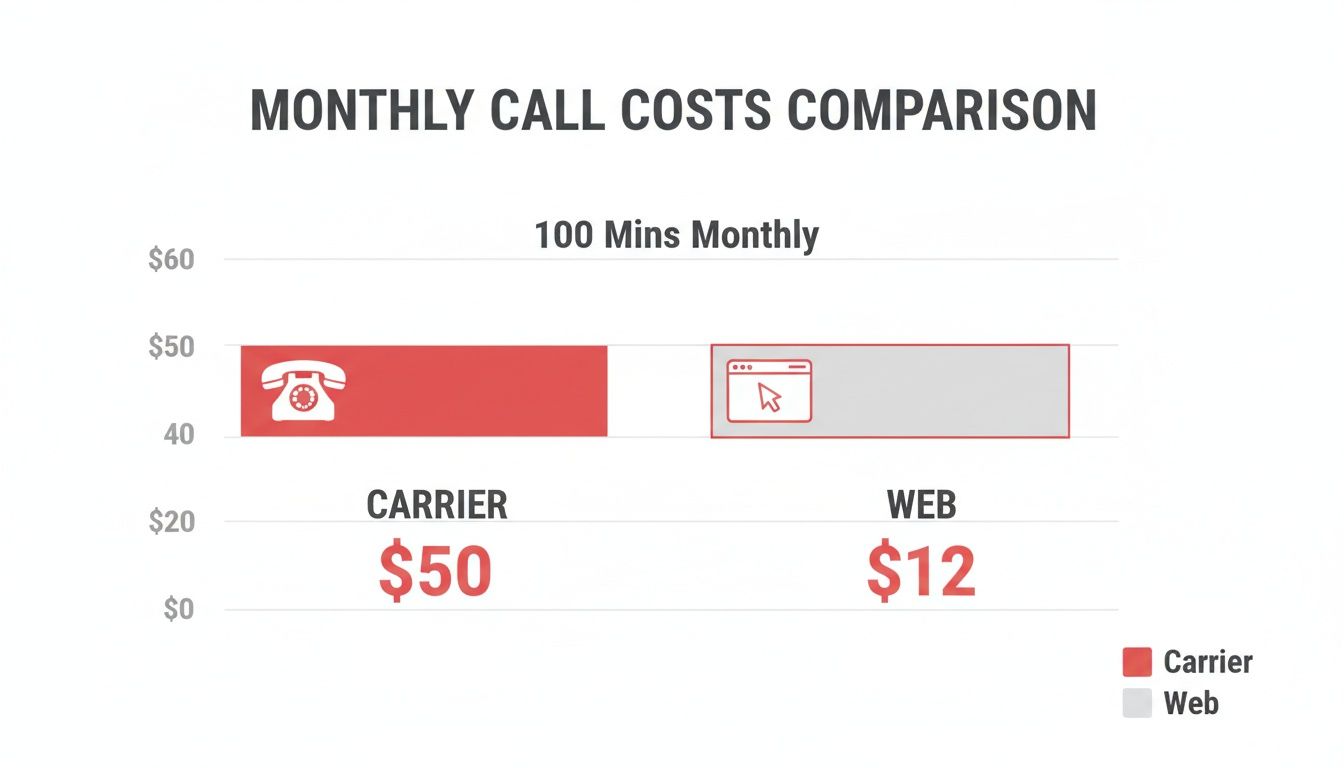
As you can see, we're talking about a dramatic reduction in cost that adds up to serious savings year after year.
Let’s break down exactly what this looks like with a quick side-by-side comparison.
This table shows just how much you can save on a single 30-minute call by ditching your traditional carrier for a modern, browser-based solution. The numbers speak for themselves.
| Calling Method | Setup / Subscription | Cost per Minute (Example) | Total Cost for 30 Min Call | Key Disadvantage |
|---|---|---|---|---|
| Mobile Carrier | $10-15/mo add-on fee | $1.50 | $45.00 (+ monthly fee) | Extremely high per-minute rates and subscription traps. |
| Browser-Based (VoIP) | $0 (no subscription) | $0.04 | $1.20 | Requires an internet connection (Wi-Fi or mobile data). |
The difference is staggering. For the price of one 30-minute call with a major carrier, you could talk for over 22 hours using a browser-based service.
This affordable approach isn't just for personal chats, either. Freelancers can coordinate with international clients without sweating the bill, and small businesses can maintain a global presence without the enterprise-level cost. Best of all, flexible models like pay-as-you-go international calling mean you only pay for the minutes you actually use—a completely transparent way to manage your communication costs.
Trying to figure out the best way to call overseas can feel like a maze of options. But it's actually pretty simple once you break it down. We're going to walk through the three main ways people make affordable international calls today, so you can pick the one that makes the most sense for you.
Each one strikes a different balance between cost, convenience, and who you can actually call.

Whether you're a freelancer trying to reach a new client, a student abroad, or just keeping up with family, one of these will be a perfect fit. Let's dig in.
This is the most direct and flexible way to make cheap international calls to any phone number. I'm serious—any number.
Instead of downloading software, you just open a website like YodelPhone in your browser, punch in a number, and hit "call." It’s that simple.
The real magic here is its universality. You can dial any mobile or landline on the planet, and the person you're calling doesn't need an app or even an internet connection. To them, it's just a normal phone call. Their phone rings, they answer. Done.
You almost certainly have one of these on your phone right now. Apps like WhatsApp, Signal, and Facebook Messenger all offer free international calling, which sounds amazing on the surface. But there's a huge catch.
These calls are strictly "app-to-app." That means both you and the person you're calling must have the same app installed and be online. It's great for video chats with friends who are already on the same platform.
The crucial difference is that you cannot use these apps to call a traditional landline or a mobile number that doesn't have the app. For that, you need a true VoIP service.
That one limitation makes them a non-starter for most professional calls or for contacting businesses, government offices, or anyone you can't just ask to download an app for you.
This category is home to the pioneers, like the classic desktop version of Skype. These are standalone software programs you download and install on your computer. They've been around for a long time.
They often work as a hybrid—letting you make free calls to other users of the same software but also selling credits to call real phone numbers, just like the browser-based services. They're powerful, but can feel a bit clunky compared to modern tools that just work in your browser. You can learn more about how VoIP technology has changed international calling in our detailed guide.
Forget about downloading clunky software or wrestling with a complicated setup. The best part of modern international calling is just how simple it is. Seriously, you can go from reading this to making a crystal-clear call in under a minute, all from your web browser.
Let's walk through just how easy it is with a service like YodelPhone. The whole process is designed to be frictionless—signing up usually just takes an email, with no credit card needed upfront. This lets you kick the tires and see how it works without any commitment.
Once you're in, you’ll find a clean, intuitive interface. It’s built to feel just like the dialer on your smartphone: a dial pad, a spot to type the number, and a clear display of your call credit.
Here’s what you’ll typically see. Notice there are no confusing menus or hidden settings.
Just pick the country, punch in the number, and hit the call button. That's it.
Before you even dial, you can instantly check the per-minute rate for any country in the world. Transparency is a huge advantage here. You see the exact cost before you connect, so there are no hidden fees or nasty surprises on your bill.
When you're ready to make a call, adding credit is a breeze. Most platforms let you top up with small amounts like $5 or $10, which can last for hours of talk time, depending on where you're calling. This pay-as-you-go model puts you in total control.
This straightforward approach is why the market for these tools is booming. The international calling apps segment is projected to grow at roughly 6.1% annually through 2031. For freelancers or small businesses making 300–500 international minutes a month, switching to a metered browser-based service can slash communication costs by 40–70%.
Pro Tip: Always glance at the rate table before your first call to a new country. It takes 10 seconds and confirms you're getting the best price, so you can chat without worrying about the cost.
With credit in your account, the rest is instant.
And just like that, you’re talking to someone on the other side of the world without ever leaving your browser tab.
While this method is incredibly cheap for calling any phone, you might also be interested in our guide on how to make an international call for free when you're calling someone who uses the same app as you.
For freelancers and small businesses, finding a cheap way to call internationally is only half the battle. The other half is about looking professional and working efficiently. The right calling service isn’t just a way to save a few bucks; it's a powerful tool for building credibility and streamlining how you work with clients around the world.
It all starts with what your clients see when you call them.

Think about the last time you got a call from an “Unknown” or overseas number. Did you pick up? Probably not. An unfamiliar number screams spam, and that's a terrible first impression when you’re trying to land an international client.
This is where a custom Caller ID is a non-negotiable.
When you set your outgoing calls to show your verified business number, you turn a suspicious call into a professional one. Your client sees a name and number they recognize, making them far more likely to answer.
For small teams, this one feature is a game-changer. Industry benchmarks show that a recognizable local ID can boost answer rates by 20–40% compared to anonymous or foreign numbers. This small tweak doesn't just lower your phone bill; it cuts the hidden costs of missed opportunities and playing phone tag. You can dive deeper into the global market for international calling services to see how big this industry is.
Want to take it a step further? Get a dedicated international number in a key market. This can completely change how clients see your business.
Imagine you're a US-based consultant with clients in the UK. Instead of them having to dial (and pay for) an international call, they can ring a local London number that connects directly to you, right in your browser.
This simple strategy accomplishes a few critical things:
Having a local number in your primary markets isn't just a convenience; it's a strategic move. It tells clients, "I'm available and invested in your success," without you ever needing to set up a physical office.
As your business grows, you need better oversight. Modern browser-based calling platforms are built for professional use and go way beyond a simple dialer.
Look for tools that give you:
These features transform a basic calling service into a central communication hub, giving you the control and insights needed to run a global business efficiently and affordably.
A cheap call is no bargain if you can't hear the other person. Choppy audio, lag, and dropped connections can turn a happy conversation into a frustrating mess. But here's the good news: most of the time, the problem isn't the calling service—it's your local internet connection.
Before you blame the service, do a quick check on your own setup. While Wi-Fi is super convenient, it’s also prone to interference from other devices, walls, or even your microwave. If your calls sound fuzzy, try plugging your computer directly into your router with an Ethernet cable. A wired connection is almost always more stable and faster.
You should also shut down any background apps that are secretly eating up your bandwidth. Things like:
Freeing up that bandwidth gives your call the juice it needs to be perfectly clear.
When you're discussing personal or business matters, call quality is only half the battle. You need to know your conversation is private. This is where end-to-end encryption is non-negotiable.
End-to-end encryption basically scrambles your conversation the moment it leaves your device and only unscrambles it when it reaches the person you're calling. This makes it virtually impossible for anyone in the middle to listen in. Reputable browser-based VoIP providers build this security right in, offering a level of privacy that old-school phone lines simply can't match.
Don't just assume a service is secure. Choose a provider that is upfront about its security measures. A quick check for encryption and secure payment systems gives you peace of mind.
Finally, a great calling experience means no anxiety about the final bill. The easiest way to avoid nasty surprises is to stick with a transparent, pay-as-you-go provider. This model completely eliminates the risk of paying for a monthly subscription you barely use.
Make it a habit to check the provider's rate table before you dial a new country. It takes five seconds and tells you the exact per-minute cost upfront. A trustworthy service makes its pricing clear and easy to find, putting you in complete control of what you spend, every single time.

Jumping into a new way of making calls always brings up a few questions. I've been there. Let's clear up the most common ones so you can start calling with total confidence.
Yes, absolutely. This is the single biggest reason people switch from app-to-app services like WhatsApp to a browser-based caller. You can dial any standard phone number on the planet, whether it's a mobile in Manila or your grandmother's landline in London.
The person you’re calling doesn't need a special app, a smartphone, or even an internet connection. Their phone just rings like a normal call. It’s perfect for reaching businesses, older relatives, or anyone who isn't glued to their apps.
Not at all. The entire point of a browser-based service is that it works with the gear you already have. Forget about buying a special VoIP phone or other complicated hardware.
All you really need is a device with a modern web browser and a microphone. That could be:
For the best possible audio quality, I'd recommend a basic headset with a microphone. But honestly, your device's built-in mic will get the job done for clear conversations.
The whole idea is simplicity. It takes the tech you use every day—your computer and an internet connection—and turns it into a global phone without any extra hardware or software downloads.
In many cases, it’s actually a lot more secure.
Reputable platforms use end-to-end encryption, which is a fancy way of saying your conversation is scrambled from your device all the way to the person you're calling. This makes it incredibly difficult for anyone to eavesdrop.
Traditional phone lines, especially the older analog ones, often don't have this level of protection. To keep your calls private, always pick a provider that's upfront about their security and uses trusted systems for handling payments. Knowing this is a key part of learning how to make cheap international calls safely.
Ready to place your first call in under a minute? With YodelPhone, you can call over 180 countries with crystal-clear quality, right from your browser. Sign up now and see for yourself—no downloads, no contracts, just simple, affordable global communication.

Discover how international VoIP calls can save you money and simplify global communication. Learn how they work and how to get started in minutes.

Discover voip international calling that delivers clear, affordable global calls from your browser. Learn pricing, setup, and start saving today.

Unlock affordable global calling with a pay as you go international phone service. Learn how to save on calls without contracts or hidden fees.

Discover how to make international calls cheap using modern, simple methods. This guide covers the best apps, smart strategies, and common pitfalls to avoid.