
how to call international numbers
How to Call International Numbers A Complete Guide
Making an international call feels a lot more complicated than it actually is. It all boils down to a simple, universal formula: Exit Code + Country Code + Local Number.
Once you get the hang of this sequence, you can connect with anyone, anywhere in the world. It doesn't matter if you're on a landline, your cell phone, or a modern browser-based service. The principle is exactly the same.
Forget memorizing endless strings of digits. Understanding how to dial internationally is all about knowing what those three core parts of the number do. Once you learn the structure, dialing globally becomes second nature.
This shift away from confusing carrier plans and expensive hardware is a big deal. The international calling market was estimated at about USD 1.44 billion in 2024 and is still growing.
This growth is what allows browser-based services like YodelPhone to offer much more competitive pricing, as the underlying costs from cloud providers drop with higher call volumes. You can dig into the full research on international calling market trends if you're curious about the numbers.
Each piece of an international number has a specific job. Getting them in the right order is the key to making sure your call connects.
Here's a quick reference to make sense of it all.
| Component | What It Does | Real-World Example |
|---|---|---|
| Exit Code | Tells your phone system you're dialing out of the country. | Dialing 011 from the US, or just using + on a mobile. |
| Country Code | A 1-3 digit code that routes your call to the right country. | 44 for the UK, 91 for India, or 1 for the USA/Canada. |
| Local Number | The standard phone number as if you were dialing it from inside that country. | A London number like 20 7946 0123. |
Let's look at each component a bit closer:
Exit Code: Think of this as the "international" button. It signals you're making a call outside your current country. From the US and Canada, it’s 011. But honestly, the easiest way is to just use the + symbol on your mobile—it’s the universal standard and works from anywhere.
Country Code: This is the one- to three-digit code that directs your call to a specific country. For example, the United Kingdom's code is 44, while India's is 91.
Local Number: This is just the regular domestic phone number you'd use if you were already inside that country. The only trick here is you often have to drop the leading 0 if there is one.
Key Takeaway: The single best habit you can build is to always start an international number with the
+symbol on your mobile. It automatically replaces the exit code for whatever country you're in, which gets rid of all the guesswork and prevents calls from failing. It's a small change that makes the whole process foolproof.
Knowing the three parts of an international number is half the battle. The other half is putting them together in the right order. Get this sequence right, and you'll connect every time, whether you're calling a supplier in London or checking in with family in New Delhi.
Let's walk through a real-world example. Imagine you're a designer in the US needing to call your client in London. The first thing you'll dial is the exit code.
The exit code, sometimes called the international access code, is what you dial to tell your phone network you're about to make a call outside your current country. If you're calling from the United States or Canada, that code is 011.
But honestly, the easiest and most reliable way, especially from a mobile phone, is to just use the plus sign (+).
The + symbol is the universal substitute for any country's exit code. It automatically signals an international call, no matter where you are in the world. This one little trick saves you from having to memorize different exit codes when you travel.
Pro Tip: When you save an international number in your phone's contacts, always start it with the
+symbol. This makes the number future-proof, so it will work correctly whether you’re calling from your home country or while traveling abroad. No more editing numbers on the fly.
Once you’ve got the exit code handled, you need to tell the network which country you're calling.
Right after the exit code, you'll dial the specific country code for your destination. Every country has a unique code, usually one to three digits long.
Back to our example: the designer is calling London, which is in the United Kingdom.
If you're ever unsure, a quick search for "[Country Name] country code" will give you the answer in seconds. At this point, the number for the London client looks like this: +44.
This simple diagram breaks down the three-part sequence you'll use for any international number.
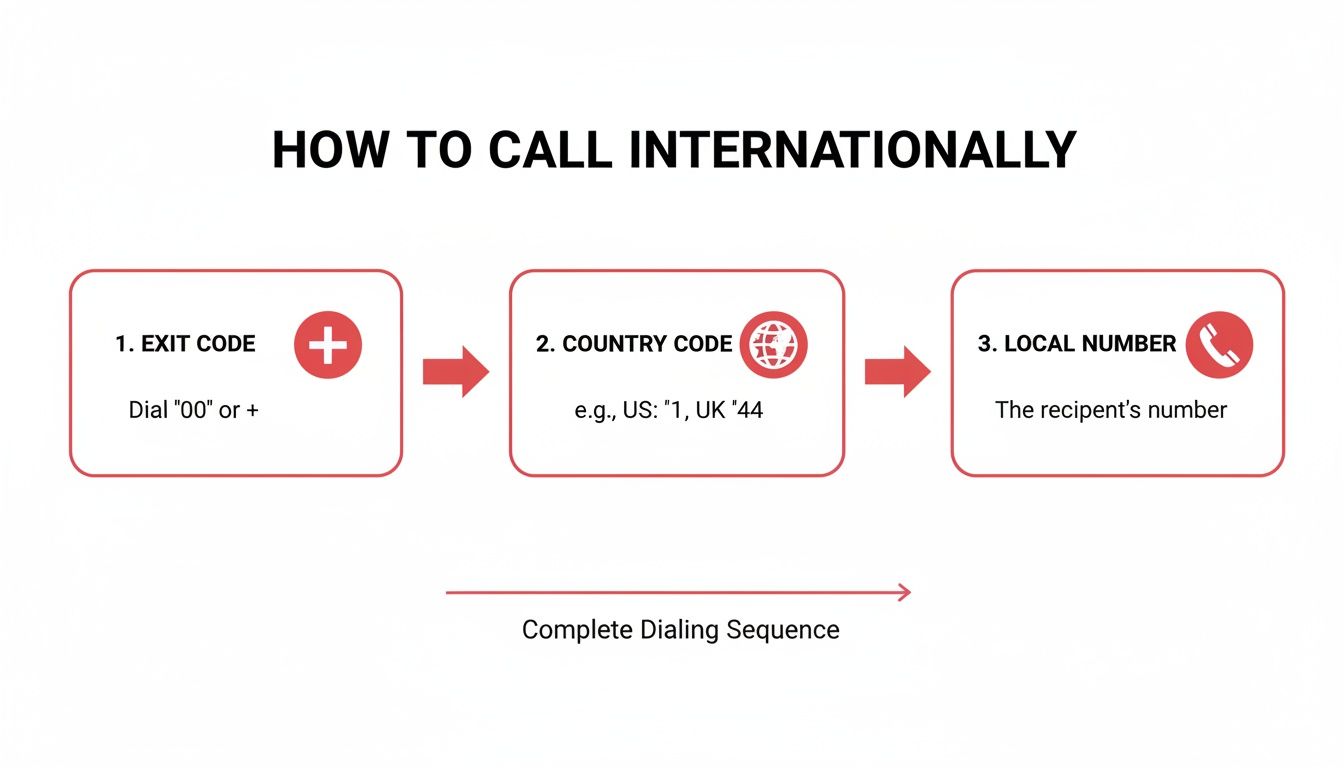
As you can see, the flow is always the same: Exit Code, Country Code, and then the Local Number. Getting this sequence down is the key.
Finally, you dial the local phone number itself. This is where a very common—and frustrating—mistake happens: the leading zero.
Many countries, including the UK, often write their domestic numbers with a leading 0. For instance, a London number might be listed as 020 7946 0123. When you're dialing from another country, you must drop that leading zero.
So, for our designer calling their London client, the full, correct dialing sequence is:
+4420 7946 0123 (notice the leading 0 is gone)The complete number they'll dial is +44 20 7946 0123. This is a critical rule. Forgetting to remove that leading zero is probably the #1 reason international calls fail to connect.
Once you've got the dialing sequence down, the next big question is how you’re actually going to place the call. Not all methods are created equal, and your choice can make a massive difference in your budget, call quality, and overall convenience.
The three main options are your traditional landline, your mobile carrier's international plan, and modern browser-based Voice over IP (VoIP) services. Let's break them down.
Using a landline feels simple enough, but it's usually the most expensive way to call abroad. Most providers hit you with high per-minute rates that sneak up on you, leading to shocking monthly bills.
Sure, the call quality is reliable because it doesn’t depend on your internet connection. But landlines offer zero flexibility. For a small business owner calling suppliers in China, the costs can spiral out of control with no clear, upfront pricing or way to track spending in real-time.
Your mobile phone is always in your pocket, making it the go-to for convenience. Most carriers will sell you an international add-on or a "travel pass," which might seem like a good deal for a quick, one-off call.
But here’s the catch: these plans are often packed with fine print, like a stingy cap on minutes or a limited list of covered countries. Step outside those lines, and you’re slammed with sky-high pay-per-use rates. This makes mobile plans a risky bet for anyone making regular international calls.
Key Insight: The convenience of using your mobile plan often hides the true cost. A single long chat with family overseas or a business call that runs a few minutes over can result in charges that are insanely higher than what you'd pay with a dedicated VoIP service.
This is where services like YodelPhone completely change the game. Browser-based VoIP lets you make calls straight from your computer or smartphone's web browser. No downloads, no contracts, and no special hardware needed.
The biggest win here is cost transparency. With a pay-as-you-go model, you only pay for the minutes you actually use, and you see the clear per-minute rates before you even dial.
For professionals and remote teams, the benefits go way beyond just saving money. You get features that are simply impossible with landlines or basic mobile plans:
This approach gives you the perfect mix of affordability, control, and professional features. If you want to see how different services compare, check out this guide on the best international calling apps to find the right fit.
To make it even clearer, here’s a side-by-side look at how these three methods stack up. It really highlights the trade-offs you're making with each choice.
| Feature | Landline | Mobile Carrier Plan | Browser-Based VoIP (YodelPhone) |
|---|---|---|---|
| Cost | Very high per-minute rates | Moderate to high, plus monthly add-on fees | Extremely low, pay-as-you-go rates |
| Transparency | Poor; costs seen on bill | Poor; complex terms and overage fees | Excellent; clear per-minute rates upfront |
| Flexibility | None; tied to a physical location | Good; call from anywhere with a signal | Excellent; call from any device with a browser |
| Team Features | None | None | Shared credits, call history, analytics |
| Caller ID | Fixed to your landline number | Your mobile number | Customizable and verified |
| Setup | Already installed | Requires plan add-on | Instant signup, no downloads |
As you can see, while landlines and mobile plans offer a familiar starting point, browser-based VoIP like YodelPhone is built for the way we communicate today—offering more control, better features, and far greater savings.
Connecting with family, friends, or clients across the globe is a modern necessity, but it shouldn't come with a shocking phone bill. We've all been there. You make a few calls, think you're within your budget, and then the bill arrives. Ouch.
The good news is, with a few smart strategies, you can slash your international calling costs without sacrificing quality. The key is to stop thinking like the big carriers want you to and start adopting methods that fit how you actually make calls.
One of the biggest money traps is the rigid monthly subscription. How many times have you paid for a bundle of "international minutes" you never actually used? It's like buying a monthly gym membership and only going twice. You're just giving away money.
A pay-as-you-go model flips that on its head. You only pay for the exact time you spend on the phone. This approach is a game-changer for anyone whose calling needs fluctuate—one month you might talk for hours, the next, just a few minutes.
Let's be honest, the most frustrating part of international calling is the lack of clarity. Hidden fees, confusing rate structures, and vague "connection charges" make it impossible to know the true cost of a call until it's too late.
Don't fall for it. Choose a service that offers clear, upfront, per-minute rates for every single country. Before you even dial, you should know exactly what that call is going to cost you. This simple transparency puts you back in control of your spending.
For a deeper dive into different methods, our guide on how to make international calls offers more detailed comparisons.
Key Takeaway: Real cost savings come from transparency. When you can see the per-minute rate before you dial, you gain complete control over your international communication budget. Every call becomes a predictable expense, not a financial gamble.
Thanks to modern internet infrastructure, browser-based calling (also known as VoIP) is more reliable and affordable than ever. With 5G coverage expected to reach 55% of the world's population in 2025 and over 240 million new internet users coming online in just one year, the quality is often crystal clear.
This is exactly why so many small businesses and freelancers now prefer flexible, per-minute browser calling. There are no downloads, no contracts, and no hassle. You simply use your internet connection to bypass the expensive networks traditional carriers rely on, leading to massive savings.
Here’s a powerful strategy, especially for businesses. You can get a virtual phone number in a country where you have clients—say, the UK or Australia.
When your clients in that country dial what looks and feels like a local number, the call is instantly routed to you, wherever you are in the world. They only pay a local rate (or nothing at all), making it incredibly easy and affordable for them to reach you.
It's a brilliant move that not only saves everyone money but also builds trust and makes your business look like it has a professional, local presence.
Even when you think you’ve dialed everything perfectly, international calls can still be frustrating. The call won't connect, the audio sounds like you're talking through a tin can, or a surprise charge shows up on your bill. These are common headaches, but don't worry—most of the time, the fix is surprisingly simple.
The biggest culprit is usually a call that just won't go through. Before you give up, take a deep breath and run through a few quick checks. It’s almost always a tiny mistake in the number sequence.
If you get a fast busy signal or an error message, just pause and look closely at the number you entered. When you’re dialing across borders, the small details are everything.
Here’s what to check first:
+ symbol? On a mobile phone, this is the universal signal for an international call. Always lead with it.020 1234 5678 must be dialed as +44 20 1234 5678. That first zero is only for calls within the UK.Running through these four things solves the problem over 90% of the time. Seriously. Just taking a moment to double-check the number will almost always get you connected.
Key Takeaway: The leading zero in a local number is for domestic calls only. You have to remove it when calling from another country. This single rule is the most common reason an international call fails to connect.
What if the call connects, but the audio is choppy, delayed, or full of static? This is almost always an internet issue, especially if you’re using a browser-based VoIP service. A weak or unstable Wi-Fi signal can make a clear conversation impossible.
If you’re dealing with bad call quality, try these quick fixes:
Sometimes, the problem isn’t your connection, but the tool you’re using. For example, some apps are built only for app-to-app calls. If you're trying to reach a landline with one of these, you'll run into a wall. Understanding why WhatsApp can't call landlines helps clarify these technical limits and points you to the right service for the job.
Finally, nobody likes getting a bill that's way higher than they expected. The easiest way to avoid bill shock is to use a service with clear, upfront pricing.
A pay-as-you-go model means you see the per-minute rate before you even dial, so there’s no guesswork. Always check your provider’s rates for the specific country you're calling. That way, you stay in complete control of what you spend.
When your business operates across borders, every single interaction shapes how you're perceived. A grainy video call or an important email that lands in a spam folder can chip away at your credibility. The same goes for phone calls. How you show up on someone's caller ID can be the difference between a client answering or ignoring you.
This is where modern calling features stop being a "nice-to-have" and become essential tools for building trust. Let’s be honest, nobody wants to answer a call from an "Unknown" or "Blocked" number, especially if it’s from an international prefix they don't recognize. Using a custom caller ID ensures your own verified number appears, instantly signaling that your call is legitimate and professional.
The global push for call verification is changing how we all look at international numbers. With spam calls on the rise, people are more cautious than ever. Security and branded-calling adoption are becoming critical. In fact, one projection shows that branded-calling frameworks will verify over 90 billion calls globally by 2030—a huge leap from under 10 billion in 2025. You can dig deeper into the rise of verified calling on Juniper Research.
For any business using virtual numbers to connect with international clients, this isn't just a trend; it's a fundamental shift. A verified caller ID doesn’t just look better. It actively combats call spoofing and builds immediate trust, which leads to much higher answer rates.
Another incredibly powerful strategy is to get a local phone number in your key markets. Imagine you're based in the US but have a growing client base in the UK. Instead of calling them from your American number (which can look intimidating and expensive), you can get a virtual UK number.
This simple change unlocks two massive advantages:
This approach is about more than just convenience—it's a strategic move that removes communication barriers. By making it easy and affordable for international contacts to reach you, you're demonstrating a commitment to their market and building a stronger, more professional relationship from the very first call.
Even after you know the basics, a few questions always pop up when you start dialing international numbers. Let's clear up some of the most common ones so you can call with confidence every time.
Think of an exit code (also called an international access code) as a signal to your phone carrier that you're about to dial a number outside your country.
From a landline in the U.S., you’d dial 011 first. But from a mobile phone, there's a much easier way: just use the + symbol. It acts as a universal exit code, automatically telling the network you're making an international call, no matter which country you're dialing from. It's the simplest and most reliable way to go.
Honestly, truly free calls to standard landlines and mobile numbers are pretty rare. What you can find are ways to dramatically cut your costs.
Browser-based VoIP services, for instance, offer super-low per-minute rates that are a tiny fraction of what traditional carriers charge. Many will even give you a free minute or two to test the call quality before you have to add any money to your account.
Key Tip: Be careful with services that claim to be "free." Most free calling apps only let you call other people who have the exact same app installed. That’s great for tech-savvy friends, but it won't help you reach your grandma's landline or a hotel front desk.
First, don't panic. It's usually a simple fix. Go back and double-check the entire number sequence you dialed:
+ symbol?If the number is definitely correct, the next thing to check is your account balance. Make sure you have enough credit to make the call. If you're using a VoIP service from your browser, a quick check of your internet connection can't hurt either—a weak or unstable signal can sometimes prevent a call from connecting.
Ready to make clear, affordable international calls right from your browser? With YodelPhone, you can start in seconds with a one-minute free trial—no downloads and no credit card required. See our transparent, pay-as-you-go rates and get connected at https://yodelphone.com.

Try a free international call trial instantly in your browser - no downloads or card required. Test call quality and connect globally in seconds.

Unlock affordable global calling with a pay as you go international phone service. Learn how to save on calls without contracts or hidden fees.

Discover the cheapest way to make international calls with practical VOIP tips, compare plans, and cut costs while keeping call quality high. Start saving now.
Discover the best way to call internationally with a quick comparison of mobile, VoIP, and browser options to save money and improve quality.