
best way to call internationally
Best Way to Call Internationally: Compare Mobile, VOIP, and Browser Options
If I had a dollar for every time someone asked me the "best" way to call internationally, I'd have enough to cover a few overpriced carrier calls. The truth is, there's no single best way—it all comes down to what you need. Are you calling your tech-savvy cousin on her smartphone, or your grandmother who only has a landline?
The best option is almost always a browser-based VoIP service. Why? It hits the sweet spot: the low cost of an internet call, but with the power to reach any phone number, landline or mobile, without forcing the other person to download an app. It's the ultimate blend of affordability and flexibility.
Not long ago, calling another country was a complicated and expensive mess. Today, you've got choices, but each comes with its own trade-offs. Getting a handle on them is the key to dodging those shocking phone bills and fuzzy, dropped calls.
This isn't a small market, either. The global demand for staying connected pushed the international call services market to a staggering USD 35.5 billion in 2024. It's expected to balloon to USD 47.9 billion by 2031 as people move away from traditional carriers that still charge $1-3 per minute. For a detailed breakdown of these trends, you can explore the full international call services market research.
Modern services like browser-based VoIP slash those costs by 70-90%, bringing rates down to just a few cents. It's a massive shift in how we connect.
So, how do you pick the right tool for the job? You need to weigh cost, convenience, and who you’re actually calling. Let’s break down your main options.
Choosing the right international calling method isn't about finding a single "best" option, but rather the best fit for your specific call. The priority shifts from pure cost savings to a balance of quality, convenience, and accessibility depending on the context.
To make it even simpler, here’s a table that cuts right to the chase, comparing each method based on what really matters.
| Method | Best For | Average Cost | Ease of Use |
|---|---|---|---|
| Mobile Carrier | Occasional, short calls where reliability is paramount. | High ($1-$3/min) | High (Direct Dial) |
| VoIP Apps | Frequent calls between smartphone users with good internet. | Free (App-to-App) | Moderate (Requires App) |
| Browser-Based Service | Calling any number affordably from any device. | Low ($0.01-$0.20/min) | Very High (No Install) |
| Calling Cards | Users without smartphones or consistent internet access. | Low to Moderate | Low (Complex Dialing) |
As you can see, the right choice completely depends on the situation. For quick, critical calls, your carrier might be fine. For daily chats with another smartphone user, an app works great. But for everything else—especially reaching landlines or people without apps—a browser-based service offers unmatched flexibility and value.
Choosing how to call another country isn't just about finding the cheapest rate. The real decision comes down to a trade-off between three things that matter most: cost, quality, and convenience. Get one wrong, and you’re either overpaying or dealing with a dropped call at a critical moment.
Let’s break down how the main options stack up in the real world. We’ll look at the pricey reliability of your mobile carrier, the app-to-app limitations of services like WhatsApp, and the instant flexibility you get from browser-based calling. This will help you see which one actually fits what you need.
On the surface, cost seems simple, but it’s a minefield of hidden fees, confusing monthly plans, and surprise charges. The true cost isn’t the advertised per-minute rate; it’s the entire financial model you’re locked into.
Your mobile carrier has the most complicated pricing. They’ll sell you an international “add-on” for a monthly fee that gives you a handful of minutes or slightly lower rates. But if you call without a plan, the pay-per-minute rates are astronomical, often hitting $1-$3 per minute. The convenience is there, but you pay a massive premium for it.
VoIP apps like WhatsApp and FaceTime look free, and they are—as long as you’re calling another person who also has the app installed and a good Wi-Fi connection. The second you need to call a landline or someone without the app, that "free" model completely falls apart. It’s a closed system.
This is where browser-based services like YodelPhone flip the script. They run on a simple, transparent pay-as-you-go model. You add credits to your account and only pay for the minutes you actually use, with rates that are often just pennies. No monthly commitments, no connection fees, no fine print.
The biggest shift in international calling is the move away from restrictive monthly plans toward flexible, transparent pricing. A pay-as-you-go model empowers users by eliminating commitment and ensuring they only pay for what they use, which is a fundamental reason for the rapid adoption of browser-based VoIP.
A bad connection can ruin a conversation, whether you're closing a business deal or catching up with family. The technology powering your call dictates its clarity and stability more than anything else.
Mobile carriers are the undisputed champions here. They use traditional cellular networks (PSTN), which are built for one thing: voice. The result is consistently clear audio that doesn't depend on your internet. For a business traveler in a hotel with terrible Wi-Fi, that reliability is non-negotiable and worth the extra cost.
On the flip side, both VoIP apps and browser-based services live and die by your internet connection. A weak Wi-Fi signal or spotty mobile data will lead to garbled audio, echoes, or dropped calls. It's a direct relationship.
However, modern VoIP isn't what it used to be. Services like YodelPhone now use advanced audio codecs and optimized networks to deliver HD voice that’s often indistinguishable from a traditional call, assuming you have a decent internet connection. For a deeper dive into the technology, you can explore our guide on how international calling with VoIP works.
How fast can you make a call? This is where the user experience really separates the options. Your mobile carrier offers pure simplicity: open your phone’s dialer and call. There's no app to install and nothing new to learn.
VoIP apps add a layer of friction. Both you and the person you're calling have to download the same app, create an account, and add each other as contacts. This makes them totally impractical for calling a new client or a tech-averse relative who doesn’t use smartphone apps.
Browser-based services strike the perfect balance. They use the internet like VoIP apps, but their killer feature is the zero-installation setup.
There's nothing to download. This makes it the most flexible and accessible option for instantly calling any phone number—landline or mobile. It’s a game-changer for freelancers, remote teams, and anyone who needs to connect without forcing software on others.
The market data backs this up. VoIP now accounts for 58.5% of global revenue from international minutes. Why? People are saving up to 90% compared to traditional carriers. A call to India that costs $0.20/minute with a carrier can be just $0.01/minute with VoIP. This trend is pushing the booming international call services market toward a projected USD 2.29 billion by 2032.
To make the differences crystal clear, let's put these three methods head-to-head. This table shows you exactly what you gain—and what you give up—with each choice.
| Feature | Mobile Carriers | VoIP Apps (e.g., WhatsApp) | Browser-Based Service (e.g., YodelPhone) |
|---|---|---|---|
| Reach | Can call any mobile or landline number globally. | Can only call other users of the same app. | Can call any mobile or landline number globally. |
| Cost Model | High pay-per-minute rates or expensive monthly plans. | Free for app-to-app calls over an internet connection. | Low-cost, transparent pay-as-you-go per-minute rates. |
| Setup Required | None. Uses your phone's native dialer. | Requires both parties to download and set up the app. | None. Instantly accessible from any web browser. |
| Device Flexibility | Limited to your specific mobile phone and SIM card. | Works on any device where the app is installed. | Works on any device with a modern web browser. |
| Call Quality | Excellent and highly reliable via cellular networks. | Variable; dependent on the internet quality of both users. | Excellent with a stable internet connection. |
| Professional Features | Typically none beyond basic calling. | Basic features like video and group chat. | Advanced features like virtual numbers and call analytics. |
This breakdown tells the whole story. Mobile carriers give you reliability at a steep price. VoIP apps offer free calling but only within their walled garden. And browser-based services deliver the universal reach of a carrier with the low cost of VoIP, all without making you download a thing.
Let's be honest: there’s no single "best way to call internationally." The right choice for a CEO coordinating with an overseas factory is completely different from what an expat needs to catch up with their grandmother. The best solution is always the one that fits your specific needs, habits, and priorities.
To help you find that perfect fit, here’s a quick decision guide. It cuts through the noise and points you to the right path based on what matters most to you: budget, call quality, or pure convenience.
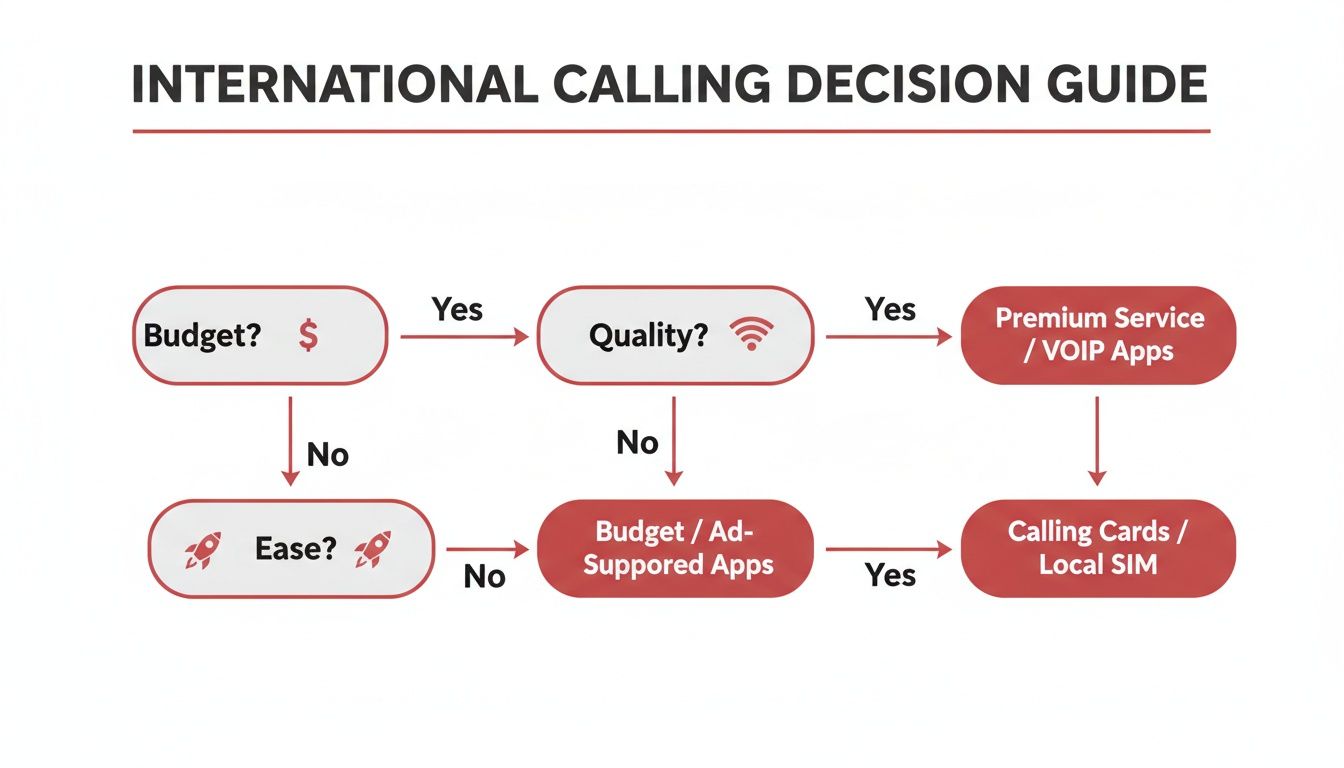
The flowchart makes one thing clear: if your goal is simply to reach any number in the world with maximum flexibility and minimal cost, browser-based services are the most direct route.
But let's see how this plays out in the real world by matching a few different people with their ideal calling method.
For the professional who lives out of a suitcase, reliability isn't a nice-to-have—it's everything. This person needs to call clients, partners, and landlines in different countries, often from places with spotty Wi-Fi like hotels or airport lounges. A dropped call or garbled audio can instantly damage their credibility.
Their mobile carrier offers rock-solid reliability over cellular networks, but the cost for frequent, long calls is just too high. And VoIP apps? They’re a non-starter, since they can't reliably connect to a client's landline or reach someone who doesn't use the same software.
An expat living abroad just needs a simple, cheap way to stay in touch with family back home. Their calls are often long, personal, and happen all the time. More importantly, they might be calling older relatives who only use a landline and aren't about to download a new app on a smartphone.
Here, the absolute lowest cost is the main driver. Mobile carrier rates would make those regular, long conversations financially impossible.
The real challenge for expats is bridging a technology gap. The best solution isn't just cheap for them; it has to be completely invisible for the person they're calling, requiring zero tech skills on the other end.
This is where the difference between VoIP apps and browser services really matters. An app might be free, but it forces a technical burden on both people.
A freelancer or small business owner has to project a professional image while keeping a close eye on their budget. They need more than just a way to make calls; they need tools that help them build a global presence, like virtual international numbers that let clients call them at a local rate.
Mobile carriers don't offer these kinds of advanced features at all. And standard VoIP apps are built for personal chats, lacking business tools like call analytics or shared team access. A detailed breakdown of the best international calling apps often reveals a sharp divide between consumer toys and business-ready tools.
You've weighed the options and picked a service. Now for the real test: making the call. It might seem a little daunting at first, but dialing internationally is actually pretty simple once you know the basic steps for each method.
Whether you're activating a carrier plan, adding a contact in an app, or dialing from a browser, you can be talking in just a few minutes. Let's walk through how to get started with each one, headache-free.
This is often the most direct route, but it requires a little prep work to avoid a shockingly high bill. The trick is to get your plan set up correctly and master the international dialing format.
The standard international dialing format is: [Exit Code] + [Country Code] + [Local Phone Number]. Getting this sequence right is the most critical step for making a successful call with your carrier.
For example, to call a London landline (country code 44) from the United States, you'd dial: 011-44-20-XXXX-XXXX. For a deeper dive into these formats, check out our guide on how to call international numbers.
Wi-Fi calling apps like WhatsApp or FaceTime are dead simple, but they only work inside their own little world. Both you and the person you’re calling have to have the same app installed, be online, and have accounts ready to go.
Here, it's less about "dialing" and more about finding a contact inside the app.
This is a great option for planned calls with friends and family who are also on smartphones. But it's totally useless for calling a landline or making a quick business call.
Browser-based services like YodelPhone give you the easiest, most flexible way to make that first call. You get the low cost of VoIP combined with the reach of a traditional carrier—and the setup takes less than a minute.
There are no downloads, no contracts, and the person you're calling doesn't need any special software. You just dial right from your browser.
Getting Started with YodelPhone:
This approach strips away all the technical stuff. You can call any landline or mobile in over 180 countries from your laptop or phone just moments after signing up. It's the perfect mix of affordability, quality, and immediate access.
Throughout this guide, we've seen the trade-offs. Mobile carriers are reliable but brutally expensive. VoIP apps are cheap but can't call a landline. Calling cards are just a mess of hidden fees and bad connections.
We built YodelPhone to cut through that noise. It's a modern, flexible approach designed for how people actually need to connect across borders today.
The biggest difference is that it’s browser-based. There’s nothing to download or install, ever. This simple change removes a huge barrier, letting you sign up and start dialing from any computer or smartphone in under a minute. When you need to make a call right now without any technical headaches, this is how you do it.
Remember the freelancer and the expat we talked about? YodelPhone was designed to be the perfect fit for both, blending professional-grade tools with dead-simple usability.
For the freelancer with global clients, it’s all about projecting a polished, local image. You can get virtual international numbers in key markets so clients can reach you with a local call. Combine that with a custom caller ID, and your personal number stays completely private.
For the expat connecting with family, it boils down to simplicity and cost. Our transparent, pay-as-you-go model means you only pay for what you use—no contracts, no surprise fees. More importantly, you can call any landline or mobile phone. Your relatives don’t need an app or even an internet connection. They just answer their phone like they always have.
YodelPhone bridges the gap between the rock-bottom prices of VoIP and the universal reach of a traditional phone carrier. It delivers low-cost calls to any number in the world, without forcing the person on the other end to change a thing.
Beyond just making calls, YodelPhone gives you real control over your communications. Every single call is protected with secure, encrypted connections, keeping your conversations private.
For businesses and remote teams, the platform offers a few more practical perks:
Ultimately, YodelPhone is a smarter way to call internationally because it just works. It gets rid of the friction. You no longer have to choose between a good price and the ability to call any number on the planet. It's the simple, dependable, and cost-effective way to connect across borders.
Making that first call abroad can feel a little confusing. Let's clear up some of the most common questions people have, so you can dial with confidence and stop overpaying.
For pure, rock-bottom cost, the winner is usually a Wi-Fi-based VoIP app like WhatsApp or FaceTime. If both you and the person you're calling have the same app and a decent internet connection, the call itself is free. You’re just using the data you already pay for.
But that "free" call comes with a huge catch: it's useless for calling landlines or anyone who doesn't have that specific app on a smartphone.
For those very common situations, a browser-based service is your next best bet. They offer straightforward pay-as-you-go rates, often just a few cents a minute, which is drastically cheaper than anything your mobile carrier will offer.
In most cases, no, you absolutely don't. Modern calling solutions are designed to work with the phone and computer you already own.
The only time a different SIM makes sense is if you're a frequent traveler. Grabbing a local SIM card in the country you're visiting is a great way to get cheaper domestic rates while you're there.
Dialing internationally looks tricky at first, but it follows a simple, universal formula. Once you get it, you'll never be confused again.
The formula is always the same: [Exit Code] + [Country Code] + [Local Phone Number]. The exit code tells your network you're calling abroad, and the country code routes the call to the right place.
The exit code depends on where you are calling from. For example, if you’re dialing from the United States or Canada, the exit code is 011. If you're in the UK, it's 00.
The country code is for the country you are calling to. For instance, the UK is 44, Mexico is 52, and India is 91. A quick search for "country code for [Country Name]" will give you the right number in seconds. The good news is that many browser-based services handle all this formatting for you automatically.
Ready to make your first call without worrying about exit codes or expensive plans? YodelPhone is a simple, browser-based solution with clear pay-as-you-go pricing to over 180 countries. Try it instantly with a free trial minute—no credit card needed.

Discover how international VoIP calls can save you money and simplify global communication. Learn how they work and how to get started in minutes.

Discover voip international calling that delivers clear, affordable global calls from your browser. Learn pricing, setup, and start saving today.

Unlock affordable global calling with a pay as you go international phone service. Learn how to save on calls without contracts or hidden fees.

Discover the cheapest way to make international calls with practical VOIP tips, compare plans, and cut costs while keeping call quality high. Start saving now.