
cheap international calls
The Best Cheap Way to Make International Calls Today

Here’s the honest truth: the cheapest way you're going to make an international call is by using an internet-based service like VoIP (Voice over Internet Protocol). It’s not even a close competition. These services skip the sky-high fees traditional phone carriers love to charge, often cutting your costs by more than 90%.
Making a call to another country shouldn't feel like you're booking a flight. Those shocking phone bills are a relic of the past, all thanks to technology that uses your internet connection to connect you to anyone, anywhere.
This guide is your roadmap. We’ll cut through the noise and show you the smartest, most affordable ways to stay in touch globally, without the financial headache.
Think of this as your quick-start comparison. We'll lay out the main strategies so you can see your options clearly before we get into the nitty-gritty.
The demand for cheaper ways to talk across borders has exploded. The global market for these services hit USD 35.5 billion in 2024 and is expected to climb to USD 47.9 billion by 2031. What’s really telling is that over half of all VoIP revenue—a massive 58.5%—comes from international minutes. You can dig into more VoIP market trends on tragofone.com.
This boom means you have more choices than ever. The main contenders are:
Key Takeaway: Internet-based calling, or VoIP, is the clear winner on both price and flexibility. By routing your call over the internet, these services completely sidestep the expensive infrastructure that makes traditional phone calls so pricey.
To help you decide which path is right for you, here’s a straightforward breakdown of how these methods stack up.
This table gives you a quick summary of the most popular ways to call internationally, showing you how they work, who they're best for, and what you can expect to pay.
| Calling Method | How It Works | Best For | Typical Cost |
|---|---|---|---|
| Browser-Based VoIP | Uses your internet connection (Wi-Fi or data) to make calls from a web browser. | Individuals and businesses needing flexibility and low pay-as-you-go rates. | $0.01–$0.05 per minute |
| Calling Cards | You buy a prepaid card with a set amount of minutes for specific regions. | One-off or infrequent calls where internet access is unreliable. | Varies widely; often has hidden fees. |
| Local SIM Card | You purchase a SIM card in your destination country for local rates. | Extended stays or frequent travel to one specific country. | Low local rates, but inconvenient for multiple destinations. |
Ultimately, your best choice depends on how often you call, where you're calling, and whether you prefer the flexibility of the internet or the old-school approach of a physical card. For most people, browser-based VoIP offers the perfect balance of cost, convenience, and quality.
Finding the perfect way to call internationally isn't a one-size-fits-all deal. It really boils down to your habits. Are you a freelancer juggling clients in different time zones? A frequent traveler hopping between countries? Or just trying to stay in touch with family abroad without racking up a massive phone bill?
Let's break down the best options to find the one that fits you like a glove.
This decision tree gives you a quick visual on which path to take based on how often you call and travel.
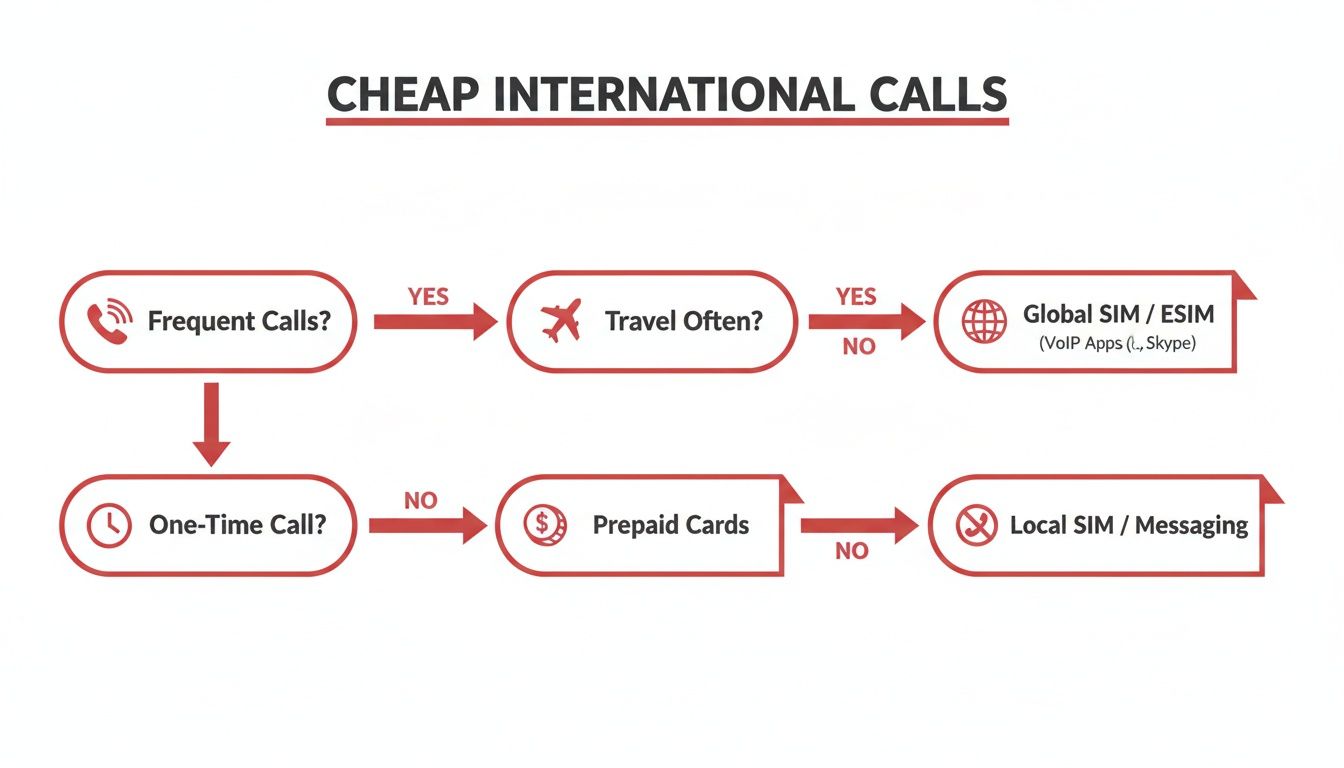
As you can see, it all hinges on whether your calls are constant, occasional, or tied to your travels.
For most people, the simplest and cheapest route is a browser-based VoIP service. Think of platforms like YodelPhone. They work by using your internet connection to place the call, completely sidestepping the pricey networks that traditional phone companies use.
What does that mean for you? You can call any landline or mobile number on the planet, right from your web browser. No downloads, no complicated setup. Just dial and go.
This is a game-changer for:
The entire economics of international calling has shifted with the rise of remote work. In fact, a whopping 58.5% of global VoIP revenue now comes from international minutes. This means providers have a huge incentive to keep their rates competitive to attract and keep users like you.
Remember these? Before the internet was everywhere, international calling cards were the only game in town. You’d buy a physical card, dial an access number, punch in a long PIN, and then finally dial the number you wanted to reach.
While you can still find them, they’re loaded with trap doors. Many have hidden costs like “connection fees,” weekly service charges, or minutes that mysteriously expire. They’re a decent last-resort option if you have zero internet, but they’ve been lapped by far more transparent and user-friendly technologies.
Picture this: You need to call a hotel in Spain to confirm a booking. With a calling card, you're fumbling with PINs and access codes. With a browser-based tool, you just type in the number and click call.
If you find yourself spending a lot of time in one specific country, grabbing a local SIM card is a brilliant move. Just pop a local SIM into your unlocked phone, and you’ll get a local number and pay local rates for calls, texts, and data. This is clutch for a multi-week trip or if you're temporarily living abroad.
On the other hand, if you're a country-hopper, an international SIM card might be more your speed. These are designed to work across multiple countries, saving you the hassle of buying a new card at every border. The catch? The per-minute rates are almost always higher than a local SIM or a good VoIP service.
Which SIM should you grab?
| SIM Card Type | Best For | Pros | Cons |
|---|---|---|---|
| Local SIM | Long stays in a single country | The absolute cheapest local rates | A pain if you visit multiple countries |
| International SIM | Multi-country trips | The convenience of having one card | Higher rates than local SIMs or VoIP |
Finally, for businesses that want to look and feel local in a foreign market, a virtual phone number is the ultimate tool. This is a real, local phone number from another country that forwards all incoming calls to your device over the internet.
For example, a company in London can get a New York (+1) phone number. When clients in the U.S. call that number, they pay a local rate, and the call rings right through to your office in the UK. It’s an instant way to build trust and make your business feel accessible.
If this sounds like what you need, our guide to the best international calling apps can help you compare features and find the perfect fit for your business goals.
Theory is one thing, but actually connecting a call is what matters. Let's walk through exactly how to place your first affordable international call right now using YodelPhone. The best part? There’s nothing to download. You can be dialing in the next few minutes, straight from your web browser.
This isn’t just a list of features. I’m going to show you how to get set up, claim a free trial minute to test the quality, and navigate the simple dashboard. You'll see how to pop in an international number, check the per-minute rate instantly, and add credits with a straightforward pay-as-you-go model.

This setup shows just how simple a browser-based tool is. All you need is a laptop and an internet connection to get started—no complex software or hardware required.
The biggest win with a browser-based service is speed. Forget about finding an app in the store, waiting for it to download, and then going through a lengthy installation. Getting started with YodelPhone is designed to be as fast and painless as possible.
Just head over to the YodelPhone website and sign up for a new account. It only asks for an email and a password. No credit card details are needed upfront, which is a huge relief if you just want to kick the tires.
As soon as you verify your email, a free trial minute is instantly loaded into your account. This is your chance to make a real call, hear the quality for yourself, and see how it works. It's a genuine test drive before you spend a single cent.
Once you’re logged in, you'll land on a clean, uncluttered dashboard. This is your command center. We intentionally avoided cramming it with confusing menus so you can find what you need and get dialing.
Here’s a quick tour:
Pro Tip: Before you make a real call, play around with the dialpad. Enter numbers for a few countries you call often and see the rates pop up. It’s a quick way to see just how much you can save compared to your mobile carrier.
Ready to use that free minute? Let's make a call. The process is exactly like dialing from any other phone, just with a few internet-powered advantages.
Your computer’s microphone and speakers (or your headset) will kick in, and the call will connect just like a normal phone call. Thanks to modern VoIP tech, the quality is usually crystal clear.
After your free trial minute is up, you’ll need to add some credits to keep calling. YodelPhone runs on a pay-as-you-go model, which is perfect for anyone trying to control their spending. You’re never roped into a monthly subscription or a scary contract.
To add credits, just:
The credits hit your account instantly, and they never expire. This way, you only pay for what you actually use. You can add a small amount for one important call or a larger sum if you’ll be calling family frequently. You're completely in control.
Finding a cheap way to make international calls is a great start, but it’s only half the battle. A call that costs pennies is worthless if the connection is choppy, delayed, or worse, insecure. When you switch from traditional phone lines to internet-based services, it's natural to wonder about performance and privacy.
The good news? Modern VoIP (Voice over Internet Protocol) technology often delivers quality that’s far superior to old-school landlines.
Let's dive into what makes a call clear and safe, and how you can lock in the best experience every time you dial.
When you make a call over the internet, its clarity depends almost entirely on your connection's speed and stability. Unlike a landline with its dedicated physical wire, a VoIP call travels as tiny digital packets across the web.
Think of it like streaming a movie. A strong, stable Wi-Fi signal gives you a smooth, buffer-free film. A weak or congested one results in pixelation and frustrating pauses. The exact same principle applies to your voice.
Here are the key factors at play:
Practical Tip: For the best quality, always choose a stable Wi-Fi network over a fluctuating mobile data signal, especially if you're on the move. A wired Ethernet connection to your computer will almost always provide the most reliable call experience.
Beyond clarity, security is a huge deal. How can you be sure no one is listening in on your private or professional conversations? This is where end-to-end encryption becomes non-negotiable.
Encryption scrambles your call data into an unreadable code the moment it leaves your device and only unscrambles it when it reaches the person you're calling. Only you and the recipient have the "keys." This makes it virtually impossible for anyone in the middle—including the service provider or any potential eavesdroppers—to intercept and understand your conversation.
Reputable browser-based services like YodelPhone build this security right into their platform. It's a massive advantage over older methods like calling cards, which often route calls through unsecured public telephone networks.
The shift to internet-based communication is happening on a massive scale. The broader international calling market is projected to hit around USD 75 billion by 2030, a clear sign of how much voice traffic is moving online. When you use a browser-based platform, you're tapping into the same secure global backbone used by large enterprise contact centers. You can find more insights on call center technology trends on ximasoftware.com.
You have more control over your call experience than you might think. Before you dial that important international number, run through this quick checklist to make sure both quality and security are locked in.
By paying a little attention to your setup, you can confidently make calls that are not only cheap but also crystal clear and completely private.
Think of these as the pro moves. Small tweaks to how you call can lead to big savings over time, turning a cheap service into an incredibly efficient one without sacrificing the connections that matter.
While most modern VoIP services have flat rates, some providers—especially those connecting to landlines in certain regions—still offer cheaper prices during off-peak hours. This usually means late at night or on weekends in the country you're calling.
Before you dial, take a minute to check your service's rate schedule. It sounds small, but shaving a few cents off every minute really adds up. Over a month, that could be enough for a couple of free calls.
One of the easiest ways to cut costs is to stop using your mobile data for international calls. Public Wi-Fi at a café, library, or airport is your best friend here, but you need to be smart about it.
The biggest win here? Using Wi-Fi completely sidesteps those insane data roaming charges from your mobile carrier. This is a non-negotiable tip if you're traveling abroad, where data costs can be astronomical.
Most calling platforms want to keep you around, and they’ll often reward you for your loyalty. Don't sleep on these built-in savings. For instance, YodelPhone has a referral program that can earn you free calling credits just for spreading the word.
Keep an eye out for programs like these:
These little perks are easy money. If you already like the service, telling a friend about it is a dead-simple way to pay for your next call. For more ideas, check out our guide on how to make an international call for free.
If you're running a business, a virtual local number can completely change the game. This is a phone number from your client's country that forwards calls over the internet directly to you, wherever you are.
Here's the magic: when your international clients dial this number, they pay a local rate—or nothing at all. This instantly removes a huge barrier to communication, making them far more likely to call. It also makes your business look local and trustworthy, which is a massive plus for customer relationships.
Finally, set aside ten minutes once a year to look at your calling patterns. A quick review can uncover spending habits you didn't even know you had and point you toward new ways to save.
Just ask yourself a few questions:
This simple check-up ensures you're not leaving money on the table. By staying mindful of these tips, you can guarantee you're always getting the absolute best deal possible.
Jumping into the world of international calling can feel a little confusing at first. Even with today's tech making it easier and cheaper than ever, a few questions always pop up. Let's clear the air and give you some straightforward answers so you can start calling with confidence.
We'll cover everything from how to actually dial the number to whether those internet calls are really cheaper.
You absolutely can, but it’s almost always the most expensive way to do it. Your regular mobile carrier (think AT&T, Verizon, etc.) is known for charging a fortune for international long-distance calls. Those per-minute rates add up shockingly fast.
Before you even think about dialing, do yourself a favor and check your carrier’s international plan rates. Most people quickly realize that using a dedicated service like a VoIP app or a browser-based tool is a much, much smarter move for their wallet.
Getting the format right is crucial, but it's simpler than you think. A tiny mistake can mean the call won't go through. Luckily, there's a universal format that works from pretty much any country or device.
Here’s the breakdown:
Nailing this format is key. For a deeper dive, check out our complete guide on how to call international numbers.
Yes, and the difference is often staggering. Internet-based calls (also known as VoIP) work differently. They skip the old-school, expensive phone lines your carrier uses and instead send your voice as digital data over the internet. It's way more efficient, and that efficiency translates into huge savings for you.
A standard international call through a major mobile carrier can cost anywhere from $0.25 to over $3.00 per minute. A VoIP service like YodelPhone, on the other hand, often charges just $0.01 to $0.05 per minute for that same call.
That means you could talk for a full hour with a VoIP service for less than what a single minute costs on your mobile plan. The savings are real, and they are massive.
Not anymore. While plenty of services still rely on apps you have to download, modern platforms let you make calls right from your web browser—Chrome, Safari, Firefox, you name it. This is a game-changer for a few reasons:
It’s the perfect option if you value speed and simplicity and don't want to clutter your phone with yet another app.
This completely depends on the service you choose. Some apps might show a generic number or "Unknown Caller," which is a problem. Most people (myself included) will ignore a call they don't recognize.
The best services, however, offer Caller ID customization. Platforms like YodelPhone let you verify your own mobile or landline number. When you make a call, your actual number shows up on their screen. This way, your friends and family know it's you calling, which is especially critical for business professionals who need to maintain a trusted, recognizable presence.
Ready to make your first low-cost international call without any downloads or contracts? YodelPhone offers crystal-clear connections and transparent, pay-as-you-go pricing to over 180 countries. Try YodelPhone today and get a free trial minute to experience the quality for yourself.

Discover how international VoIP calls can save you money and simplify global communication. Learn how they work and how to get started in minutes.

Discover voip international calling that delivers clear, affordable global calls from your browser. Learn pricing, setup, and start saving today.

Unlock affordable global calling with a pay as you go international phone service. Learn how to save on calls without contracts or hidden fees.

Discover how to make international calls cheap using modern, simple methods. This guide covers the best apps, smart strategies, and common pitfalls to avoid.