
best way to make international calls
Best Way to Make International Calls: A Practical Guide to Cheaper, Clearer

Calling family or clients across borders shouldn't be a headache, and it definitely shouldn't be expensive. The truth is, the best way to make international calls today is with a modern VoIP (Voice over Internet Protocol) service—specifically, a browser-based one that lets you pay as you go. This approach gives you the rock-bottom costs of internet calling without the hassle of downloading apps or getting locked into a contract.
Whether you’re catching up with relatives, managing a global team, or supporting international customers, you need a calling solution that just works—without breaking the bank. Thankfully, the days of paying outrageous mobile carrier fees or fumbling with prepaid calling cards are long gone. You’ve got options now, but each comes with its own quirks.
This guide is here to cut through the noise. We'll compare every practical option side-by-side, from the old-school methods to the latest internet-based services, so you can pick the right one for you.
Making the right call (pun intended) starts with knowing what’s out there. Here are the main players we'll break down:
The key is to match the service to your specific needs. A freelancer requiring a professional caller ID has different priorities than someone making casual calls to relatives abroad.
The world is more connected than ever, and the demand for better ways to communicate internationally is exploding. As global business and travel rebound, the international call services market—valued at $1.58 billion—is set to jump to $2.38 billion by 2029. A huge driver for this is the massive 34% surge in global tourist arrivals, which highlights just how much people are shifting to flexible, internet-based platforms that can keep up.
This guide will walk you through everything you need to know about how to make international calls the smart way. Once you understand the real costs, quality, and features of each method, you'll be able to choose the best solution with confidence. Let's dive in.
Choosing the right way to call abroad isn't just about finding the cheapest rate. You have to weigh the trade-offs between cost, call quality, and sheer convenience. To figure out what’s best for you, let’s put the main options head-to-head.
For pure, brain-dead simplicity, nothing beats just dialing from your existing mobile phone. No apps, no new accounts, no fuss. You just dial. But you pay a steep, steep price for that convenience.
Pay-as-you-go rates are notoriously high, often hitting $1.00 per minute or more, even for calls to major countries like the UK or Mexico. You can get a monthly add-on plan to lower this, but that locks you into a recurring fee, which is a waste of money if you don't call internationally every single month.
Our take: Carrier plans are consistently the most expensive way to call internationally. They’re really only good for true emergencies when you have no internet and no other choice.
Think about it: a 30-minute call to the UK could easily run you $30 to $60. With other methods, that same call could cost less than a dollar. It's just not a practical option for regular chats.
VoIP (Voice over Internet Protocol) apps like WhatsApp, FaceTime, and Skype completely changed the game, making app-to-app calls free from anywhere in the world. For catching up with friends and family who also use these apps, they're fantastic.
The big catch? Both of you need to have the exact same app installed and be online. This creates a walled garden that’s useless for calling landlines, reaching your elderly grandmother who only has a basic phone, or contacting a business that doesn't use WhatsApp. This is especially true now that major players like Skype are being retired, forcing users to find other solutions.
And while some apps let you call real phone numbers, it usually means buying credits and dealing with confusing rate tables, which adds a layer of hassle.
Browser-based VoIP is the next evolution, taking the low cost of internet calling and blending it with the flexibility of a traditional phone. Services like YodelPhone let you dial any number on the planet—mobile or landline—straight from your web browser. No downloads, no installations, no contracts.
This approach gives you the best of both worlds. You get rock-bottom per-minute rates without making the person you're calling download an app or even own a smartphone. You just open a tab on your laptop or phone, type in the number, and you're connected.
Remember those physical cards you'd buy at the corner store? They were a popular choice once, but now they're a legacy option riddled with problems. They lure you in with low advertised rates, but hidden connection fees, weekly "service" charges, and aggressive minute-rounding drain your balance in no time.
It’s common to hear about terrible call quality, dropped connections, and the maddening process of punching in long access numbers and PINs for every single call. With far better and more transparent options available, calling cards are just not worth the headache anymore.
To make the decision a little clearer, we've broken down how each method stacks up across the factors that matter most.
| Method | Average Cost (Per Minute) | Call Quality | Setup Complexity | Best For |
|---|---|---|---|---|
| Mobile Carrier Plan | $1.00 - $3.00+ | High (Cellular Network) | None | Emergencies, infrequent calls |
| VoIP Apps | Free (App-to-App) to $0.02 - $0.10 | Varies (Internet Dependant) | Low (App download) | Personal calls to other app users |
| Browser-Based VoIP | $0.01 - $0.05 | High (Internet Dependant) | Very Low (Sign-up only) | Businesses, freelancers, regular family calls |
| Calling Cards | Varies (Hidden Fees) | Low to Medium | Medium (PINs required) | Not Recommended |
The move toward internet-based calling is impossible to ignore. In fact, a whopping 58.5% of all VoIP revenue comes from international minutes, a clear sign that people and businesses are ditching old, expensive methods. You can see more data on the growth of the international calling market and its trends. This shift explains exactly why VoIP apps and browser-based services have become the new standard for anyone looking to make affordable global calls.
Choosing how to call internationally isn't a one-size-fits-all deal. The right tool really depends on who you are and why you're dialing. A casual chat with your grandma has totally different needs than a critical sales call with a new client.
If you match the tool to the task, you'll stop overpaying for features you don't use and avoid settling for a service that makes you look unprofessional. Let's break down the best options for different people.
When all you want is to stay connected with loved ones abroad, cost and simplicity are everything. You need something straightforward that doesn’t demand a bunch of technical know-how or lock you into a monthly subscription for a few calls here and there.
Sure, free apps like WhatsApp are great, but they hit a wall the second you need to call a landline or reach someone who doesn't use the same app. This is where browser-based VoIP services really shine for personal calls. They give you incredibly low per-minute rates without any monthly commitment, making them perfect for both regular catch-ups and the occasional call.
Key Takeaway: For personal calls, a pay-as-you-go browser service is the way to go. It gives you the flexibility to call any number—landline or mobile—at a tiny fraction of what mobile carriers charge, without being stuck in an app-to-app bubble.
As a freelancer, every call you make is a reflection of your brand. You can't compromise on professionalism, but you also have to watch every penny. A browser-based solution hits that sweet spot, delivering business-grade features without the hefty price tag of traditional enterprise systems.
One of the most important features is the ability to use your existing phone number as a custom caller ID. This ensures clients see a familiar, professional number and are much more likely to pick up. Plus, you get detailed call logs, which are a lifesaver for tracking billable hours and managing expenses.
The image below shows just how clean and simple it is to make calls right from your computer with a platform like YodelPhone.
This dashboard gets straight to the point: instant global calling, clear cost tracking, and no complicated software to install.
For a small business or a distributed team, communication needs to be scalable, collaborative, and cheap. Trying to manage individual accounts and expenses for every single team member is a recipe for chaos and overspending. This is where centralized management changes the game.
Look for a service that offers team accounts with shared credits. You can add multiple users under a single account, which radically simplifies billing and guarantees everyone gets the same low calling rates. A unified dashboard gives you a bird's-eye view of all call activity and spending across the entire team.
Better yet, the ability to buy international phone numbers is a massive advantage for building a local presence. A customer in Germany is way more likely to answer a call from a German number than one from an unfamiliar country code. This simple trick can dramatically boost your answer rates and build trust with your global clients.
For sales and support teams, every answered call can directly translate to more revenue and happier customers. The biggest hurdle in international outreach is often just getting someone to pick up the phone. As we've mentioned, a local presence is king here. Using a service that lets you display a local number can boost answer rates in a big way.
But it goes beyond that. Integration capabilities are a huge plus. Some advanced browser-based services can connect with your CRM or helpdesk software. This means calls get logged automatically, saving your team a ton of time and ensuring every customer interaction is recorded. Suddenly, your calling platform isn't just a utility—it's a core part of your workflow, feeding you data to refine your strategy and improve performance.
Browser-based VoIP services are quickly becoming the smartest way to make international calls, completely sidestepping the usual hassles. Forget dealing with your mobile carrier or making friends and family download a specific app. These platforms let you dial any number in the world right from your web browser, like Chrome or Safari. It’s a simple but powerful shift that makes global communication as easy as opening a new tab.
This approach gives you the cheap rates of internet calling with the dead-simple accessibility of a website. There’s no software to install and no confusing setup. You just create an account, add a few dollars in credit, and start dialing.
The magic that makes this possible is a technology called WebRTC, which stands for Web Real-Time Communication. In simple terms, WebRTC is an open-source project that gives your browser the built-in ability to handle high-quality, real-time audio and video calls. You don't need any special plugins or software because the capability is already there.
Think of it as a communications engine that’s already installed in your browser. When you use a service like YodelPhone, you’re just tapping into this native power to create a secure, direct connection for your call. This not only makes the experience incredibly smooth but also keeps your conversations encrypted and private from end to end.
By using WebRTC, browser-based platforms offer a calling experience that feels just as clear and reliable as a traditional phone call, but for a tiny fraction of the price. The tech does all the heavy lifting in the background, so all you have to do is dial.
This is a huge improvement over app-based services. With old giants like Skype being retired and absorbed into complex platforms like Microsoft Teams, users are often forced into ecosystems they don't want or need. Browser-based calling cuts through that noise by staying simple, independent, and accessible on any device with an internet connection.
The biggest win is the instant setup. You can literally go from discovering a service to making your first international call in under a minute. That’s a world away from negotiating a new plan with your carrier or trying to convince a relative to download and learn a new app.
Another massive benefit is the pay-as-you-go model. Most browser-based services let you add credits as needed, ditching monthly subscriptions entirely. This is perfect for anyone who makes international calls occasionally but wants access to low rates when they do. You only pay for the minutes you actually use, giving you complete control over what you spend. You can find more details in our complete guide covering cheap ways to call internationally.
The key advantages are straightforward:
Beyond just personal calls, these platforms pack some seriously powerful tools for freelancers, small businesses, and teams. These features can turn a simple calling tool into a central part of your professional workflow.
One of the most useful features is the ability to create team accounts with shared credits. This makes billing and budgeting a breeze for small businesses or remote teams. Instead of dealing with employee reimbursements or multiple accounts, everyone can draw from a single, centrally-managed pool of funds, with detailed reports to track who’s calling where.
Even better, these services let you buy international phone numbers. This is a game-changer for businesses trying to build a local presence in other countries. Think about it: a customer in the UK is far more likely to answer a call from a local London number than a strange-looking international one. It’s a simple trick that can dramatically boost answer rates for sales and support teams, making these tools a flexible and modern way to manage global communication.
Okay, you've seen the options. Now comes the easy part: picking the right service and getting started. This shouldn't be a headache. The whole point is to move to a cheaper, better calling solution quickly. The trick is to figure out what you need before you even look at a single website.
A few quick questions will get you 90% of the way there. How often are you calling? Who are you calling, and in what countries? What’s your budget—do you prefer a monthly plan or a simple pay-as-you-go model? Answering these honestly will cut through the noise instantly.
Before you start comparing, grab a pen and jot down the answers to these. Trust me, this little self-assessment saves you from overpaying for features you'll never touch or picking a service that doesn't quite fit.
Once you've got this down, you can compare services with laser focus. It makes finding the best way to make international calls for your situation a whole lot simpler.
This flowchart shows just how straightforward the decision can be when you prioritize ease of use and affordability.
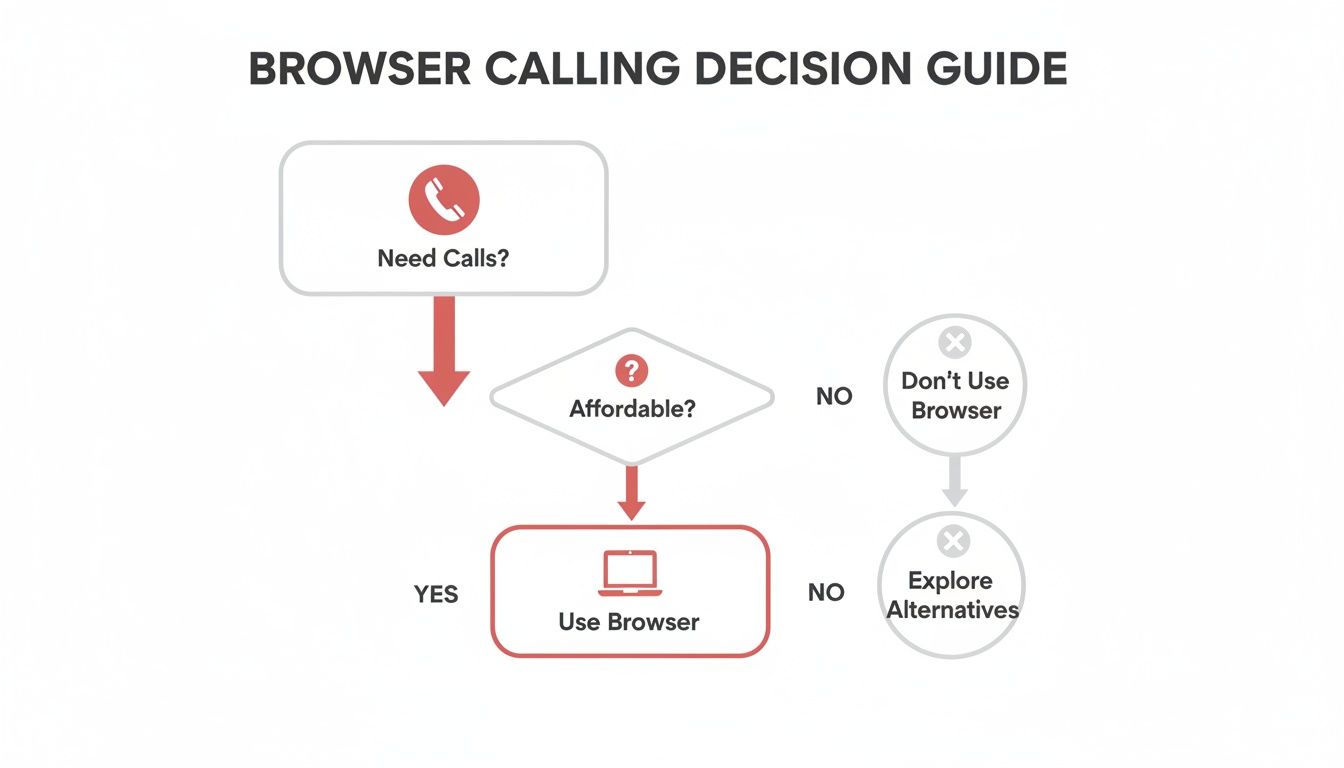
For most people who just want affordable, no-fuss calls, a browser-based service is the most direct path.
When you start looking at specific platforms, zoom in on the details that actually matter. Pricing transparency is everything. If a service isn't upfront about its per-minute rates or has a reputation for hidden fees—a classic problem with old-school calling cards—run the other way.
Check user reviews on independent sites to get a real feel for call quality and whether their customer support actually helps people. Finally, make sure the service uses modern security like WebRTC, which provides end-to-end encryption to keep your calls private. For a deeper analysis, take a look at our comparison of the best VoIP services for small business to see how the top players stack up.
Here's the killer feature of browser-based VoIP: the setup is ridiculously easy. There are no downloads, no installations, and no complicated settings to mess with. The entire process takes less than two minutes. Seriously.
Here’s how it usually goes:
A crucial pro tip: verify your phone number to use as your caller ID. It’s a simple step, usually done with a quick text message, but it makes a huge difference. People will see your real number and actually pick up the phone.
By following these simple steps, you can ditch your overpriced, clunky solution and switch to clear, affordable global calls in just a few minutes.
Making sense of international calling can feel complicated. As technology changes, the old ways of doing things have become wildly overpriced. Here are some straight-up answers to the most common questions we hear.
Yes, and the difference isn’t just small change—it’s massive. Big mobile carriers treat international calls like a premium service, and their pay-as-you-go rates often hit $1.00 per minute or more. Even their monthly international plans are often pricey and rigid unless you’re on the phone abroad every single day.
Internet-based services like VoIP apps and browser-based platforms are built differently. They send calls over the internet, completely bypassing the expensive old-school infrastructure that carriers rely on. This lets them offer rates that are often just pennies per minute to the same countries.
Think about it this way: a 20-minute call to a landline in Spain could easily cost you $20 with your mobile provider. With a browser-based service, that same call might cost you less than $0.50. The savings are instant and huge, making internet calling the clear winner on cost.
Nope. And that’s one of the best parts about modern VoIP. You use the phone and computer you already have. No special equipment, no new SIM card, nothing extra to buy.
Your call is tied to your internet connection, not your mobile plan, which gives you a ton of flexibility.
This simple setup means you can start making cheap international calls right away, as long as you have a decent Wi-Fi or mobile data connection.
These days, internet call quality is often just as good—if not better—than a traditional call. The only thing that matters is your internet connection. With a stable broadband, 4G, or 5G connection, you’ll get crystal-clear, high-definition (HD) audio without any weird delays or echoes.
Modern browser-based services run on advanced WebRTC (Web Real-Time Communication) technology. It’s designed to deliver super-reliable audio straight through your browser and even includes features like echo cancellation and noise suppression to make your conversations sound crisp and professional.
The old stereotype of crackly, delayed internet calls is a thing of the past. Reputable providers have invested heavily to ensure call quality is dependable enough for both family chats and important business calls.
Absolutely. This is a must-have feature for anyone who wants to look professional or just wants their friends and family to know it’s them calling. Most quality VoIP platforms, especially browser-based ones, let you set a custom caller ID.
It’s a straightforward process. You just type your existing mobile or landline number into the service’s dashboard. To make sure you own the number, they’ll send a quick verification code via text or an automated call. Once you enter that code, you're all set.
From then on, every international call you make will show your own number to the person you’re calling. It’s a small detail that makes a huge difference in whether people pick up, helping you maintain trust and professionalism.
This is a common question, especially if you’re used to app-to-app services like WhatsApp or the old Skype-to-Skype calling. With those, both you and the person you’re calling had to be online and using the same app.
The best international calling services today work differently—they can connect to any phone number, whether it’s a modern smartphone or an old-school landline. Browser-based VoIP services bridge this gap perfectly. You use the internet, and the service connects to the traditional phone network to reach the other person.
This means the person you’re calling doesn’t need an internet connection, a smartphone, or any app at all. As long as they have a working phone line, your call rings just like a normal one. It’s this universal reach that makes these services so powerful for everyone.
Ready to make clear, affordable international calls without the hassle? With YodelPhone, you can start dialing in seconds right from your browser—no downloads, no contracts, and no hidden fees. Try it now with a free call and see how simple global communication can be.

Discover how international VoIP calls can save you money and simplify global communication. Learn how they work and how to get started in minutes.

Discover voip international calling that delivers clear, affordable global calls from your browser. Learn pricing, setup, and start saving today.

Unlock affordable global calling with a pay as you go international phone service. Learn how to save on calls without contracts or hidden fees.

Discover the cheapest way to make international calls with practical VOIP tips, compare plans, and cut costs while keeping call quality high. Start saving now.